Setting up GST
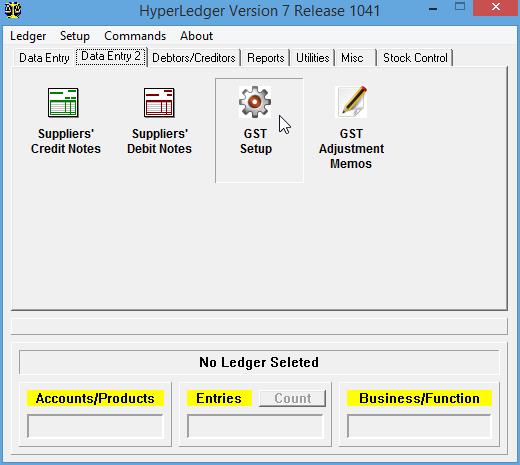
If you intend to use this ledger for GST purposes, please click the GST Setup icon under Data Entry 2 tab:
You should see the following:

The GST ID field is for you to fill in your 12-digit MyGST Number that you have obtained from the Royal Malaysian Customs Department.
The Industry Code field is for you to key in the industry code that corresponds to your type of business according to the Malaysia Standard Industrial Classification (MSIC), which is prepared by the Department of Statistics.
The GST Tax Rate (%) field is used for displaying in documents such as invoices and credit notes, but it is not used in the actual calculation of GST. This field is stored in any invoices that are issued, so if there is any change in the GST rate, the old rate stored in the invoice would be printed correctly if you need to reprint any old invoices after a new GST rate is in force. The program only uses the tax rates specified in the GST Tax Code Table for actual calculation of taxes because different items may be subject to different rates. You may view and edit the GST Tax Code Table but it is not advisable to change anything in it. If there is a change in the GST rate in the future, what you need to do is to install the latest version of the program and then click the Update GST Tax Code Table button and then key in the new rate in the GST Tax Rate % field.
After GST Tax Rate (%) field, you have to fill in 5 account numbers that is required for the program to automatically post invoices, credit notes, debit notes, payment vouchers and GST adjustment memos into the proper accounts of the ledger.
The Input Tax A/C No. field is for you to fill in the account number of your GST Input Tax account that you have created for this ledger. This account should normally be of type Current Assets. If you have forgotten the account number, you may double-click on this field to choose from a list of accounts.
The Output Tax A/C No. field is for you fill in the account number of your GST Output Tax account. This account should normally be of type Current Liabilities.
The GST Adjustment Debtors' Bad Debt (Liability) A/C is used by the GST Adjustment Memo subsystem. This account should normally be of type Current Liabilities. This account is used when you want to claim input taxes when your debtors have failed to pay you after owing more than 6 months.
The GST Adjustment Creditors' Bad Debt (Asset) A/C is also used by the GST Adjustment Memo subsystem. This account should normally be of type Current Assets. This account is used when you have failed to pay your creditors after owing them for more than 6 months.
The GST Expenses A/C is also used by the GST Adjustment Memo subsystem. This account should normally be of type Expenses. Please do not mistaken this account for ordinary expenses accounts such as electricity, water, secretarial fees etc. This account is normally used in situations where some of your input taxes cannot be totally claimed and because of that they have to be written off as expenses, and this account is where it goes to.
Click the Save button to save the GST setup.
If you have properly filled up all the fields on this form, then your document subsystems (invoices, credit notes etc.) would go into GST mode when you use them.